Why do buildings lean? (the keystone effect)

Some types of photography lend themselves to inherent distortions in the photograph, most notably those related to architectural photography. The most prominent of these is the keystone effect, a form of perspective distortion which is caused by shooting a subject at an extreme angle, which results in converging vertical (and also horizontal) lines. The name is derived from the archetypal shape of the distortion, which is similar to a keystone, the wedge-shaped stone at the apex of a masonry arch.

keystone effect in buildings
Fig.1: The keystone effect

The most common form of keystone effect is a vertical distortion. It is most obvious when photographing man-made objects with straight edges, like buildings. If the object is taller than the photographer, then an attempt will be made to fit the entire object into the frame, typically by tilting the camera. This causes vertical lines that seem parallel to the human visual system to converge at the top of the photograph (vertical convergence). In photographs containing tall linear structures, it appears as though they are “falling” or “leaning” within the picture. The keystone effect becomes very pronounced with wide-angle lenses.

Fig.2: Why the keystone effect occurs

Why does it occur? Lenses are designed to show straight lines, but only if the camera is pointed directly at the object being photographed, such that the object and image plane are parallel. As soon as a camera is tilted, the distance between the image plane and the object is no longer uniform at all points. In Fig.2, two examples are shown. The left example shows a typical scenario where a camera is pointed at an angle towards a building so that the entire building is in the frame. The angle of both the image plane and the lens plane are different to the vertical plane of the building, and so the base of the building appears closer to the image plane than the top, resulting in a skewed building in the resulting image. Conversely the right example shows an image being taken with the image plane parallel to the vertical plane of the building, at the mid-point. This is illustrated further in Fig.3.

Fig.3: Various perspectives of a building

There are a number of ways of alleviating the keystone effect. The first method involves the use of specialized perspective control and tilt-shift lenses. The best way to avoid the keystone effect is to move further back from the subject, with the reduced angle resulting in straighter lines. The effects of this perspective distortion can be removed through a process known as keystone correction, or keystoning. This can be achieved in-camera using the cameras proprietary software, before the shot is taken, or in post processing on mobile devices using apps such as SKRWT. It is also possible to perform the correction with post-processing using software such as Photoshop.

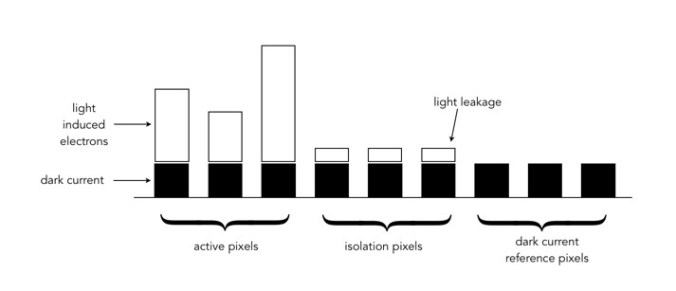
Fig.4: Various keystone effects

What happens to “extra” photosites on a sensor?

So in a previous post we talked about effective pixels versus total photosites, i.e. the effective number of pixels in a image (active photosites on a sensor) is usually smaller than the total number of photosites on a sensor. That leaves a small number of photosites that don’t contribute to forming an image. These “extra” photosites sit beyond the camera’s image mask, and so are shielded from receiving light. But they are still useful.

These extra photosites receive a signal that tells the sensor how much dark current (unwanted free electrons generated in the CCD due to thermal energy) has built up during an exposure, essentially establishing a reference dark current level. The camera can then use this information to compensate for how the dark current contributes to the effective (active) photosites by adjusting their values (through subtraction). Light leakage may occur at the edge of this band of “extra” photosites, and these are called “isolation” photosites. The figure below shows the establishment of the dark current level.

Creation of dark current reference pixels

Photosite size and noise

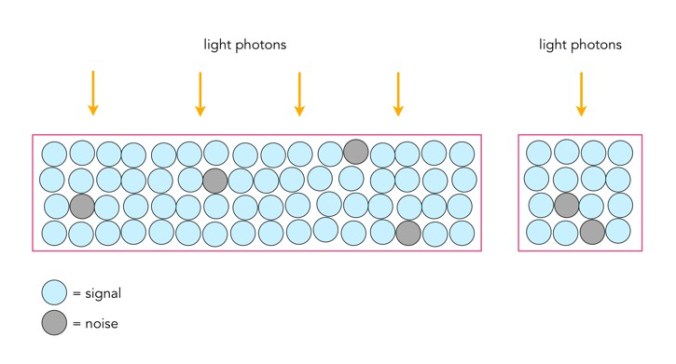
Photosites have a definitive amount of noise that occurs when the sensor is read (electronic/readout noise), and a definitive amount of noise per exposure (photon/shot noise). Collecting more light in photosites allows for a higher signal-to-noise ratio (SNR), meaning more signal, less noise. The lower amount of noise has to do with the accuracy of the light photons measured – a photosite that collects 10 photons will be less accurate than one that collects 50 photons. Consider the figure below. The larger photosite on the left is able to collect many four times as many light photons as the smaller photosite on the right. However the photon “shot” noise acquired by the larger photosite is not four times that of the smaller photosite, and as a consequence, the larger photosite has a much better SNR.

Large versus small photosites

A larger photosite size has less noise fundamentally because the accuracy of the measurement from a sensor is proportional to the amount of light it collects. Photon or shot noise can be approximately described as the square root of signal (photons). So as the number of photons being collected by a photosite (signal) increases, the shot noise increases more slowly, as the square root of the signal.

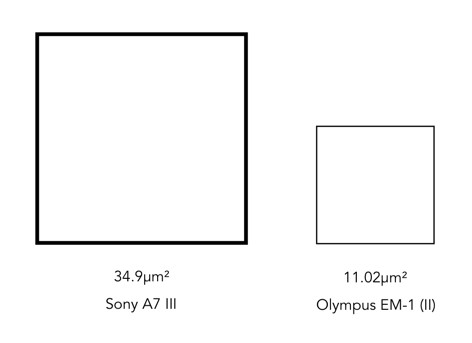
Two different photosite sizes from differing sensors

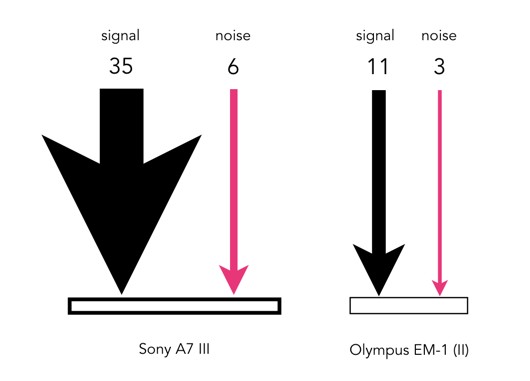
Consider the following example, using two differing size photosites from differing sensors. The first is from a Sony A7 III, a full frame (FF) sensor, with a photosite area of 34.9μm²; the second is from an Olympus EM-1(ii) Micro-Four-Thirds (MFT) sensor with a photosite area of 11.02μm². Let’s assume that for the signal, one photon strikes every square micron of the photosite (a single exposure at 1/250s), and calculated photon noise is √signal. Then the Olympus photosite will receive 11 photons for every 3 electrons of noise, a SNR of 11:3. The Sony will receive 35 photons for every 6 electrons of noise, a SNR of 35:6. If both are normalized, we get rations of 3.7:1 versus 5.8:1, so the Sony has the better SNR (for photon noise).

Photon (signal) versus noise

If the amount of light is reduced, by stopping down the aperture, or decreasing the exposure time, then larger photosites will still receive more photons than smaller ones. For example, stopping down the aperture from f/2 to f/2.8 means the amount of light passing through the lens is halved. Larger pixels are also often situated better when long exposures are required, for example low-light scenes such as astrophotography. For example, if we were to increase the shutter speed from 1/250s to 1/125s, then the number of photons collected by a photosite would double. The shot noise SNR in the Sony would increase from 5.8:1 to 8.8:1, that of the Olympus would only increase from 3.7:1 to 4.7:1.

Photosite size and light

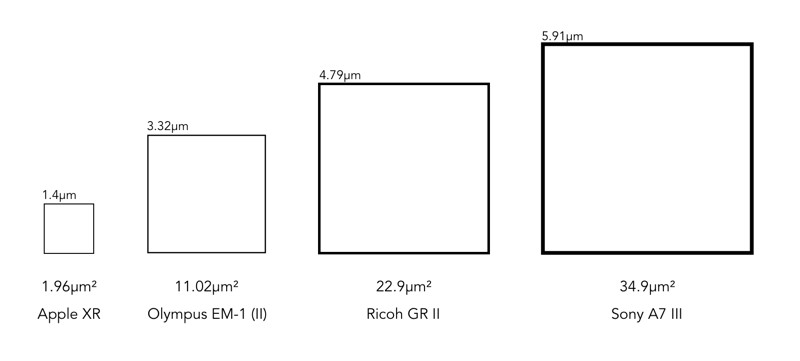
It doesn’t really matter what the overall size of a sensor is, it is the size of the photosites that matter. The area of the photosite affects how much light can be gathered. The larger the area, the more light that can be collected, resulting in a greater dynamic range, and potentially a better signal quality. Conversely, smaller photosites can provide more detail for a given sensor size. Let’s compare a series of sensors: a smartphone (Apple XR), a MFT sensor (Olympus E-M1(II)), an APS-C sensor (Ricoh GRII) and a full frame sensor (Sony A7 III).

A comparison of different photosite sizes (both photosize pitch and area are shown)

The surface area of the photosites on the Sony sensor is 34.93µm², meaning there are roughly 3× more photons hitting the full-frame photosite than the MFT photosite (11.02µm²), and nearly 18× more than the photosite on the smartphone. So how does this affect the images created?

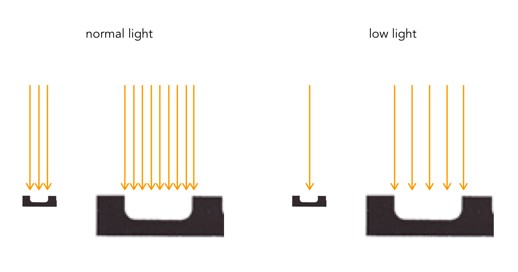
The size of a photosite relates directly to the amount of light that can be captured. Large photosites are able to perform well in low-light situations, whereas small photosites struggle to capture light, leading to an increase in noise. Being able to capture more light means a higher signal output from a photosite. This means it will require less amplification (a lower ISO), than a sensor with smaller photosites. Collecting more light with the same exposure time and, therefore, respond with higher sensitivity. An exaggerated example is shown in the figure below.

Small vs. large photosites, normal vs. low light

Larger photosites are usually associated with larger sensors, and that’s the reason why many full-frame cameras are good in low-light situations. Photosites do not exist in isolation, and there are other factors which contribute to the light capturing abilities of photosites, e.g. the microlenses that help to gather more light for a photosite, and the small non-functional gaps between each photosite.

Megapixels and sensor resolution

A megapixel is 1 million pixels, and when used in terms of digital cameras, represents the maximum number of pixels which can be acquired by a camera’s sensor. In reality it conveys a sense of the image size which is produced, i.e. the image resolution. When looking at digital cameras, this can be somewhat confusing because there are different types of terms used to describe resolution.

For example the Fuji X-H1 has 24.3 megapixels. The maximum image resolution is is 6000×4000 or 24MP. This is sometimes known as the number of effective pixels (or photosites), and represents those pixels within the actual image area. However if we delve deeper into the specifications (e.g. Digital Camera Database), and you will find a term called sensor resolution. This is the total number of pixels, or rather photosites¹, on the sensor. For the X-H1 this is 6058×4012 pixels, which is where the 24.3MP comes from. The sensor resolution is calculated from sensor size and effective megapixels in the following manner:

  • Calculate the aspect ratio (r) between width and height of the sensor. The X-H1 has a sensor size of 23.5mm×15.6mm so r=23.5/15.6 = 1.51.
  • Calculate the √(no. pixels / r), so √(24300000/1.51) = 4012. This is the vertical sensor resolution.
  • Multiply 4012×1.51=6058, to determine the horizontal sensor resolution.

The Fuji X-H1 is said to have a sensor resolution of 24,304,696 (total) pixels, and a maximum image resolution of 24,000,000 (effective) pixels. So effectively 304,696 photosites on the sensor are not recorded as pixels, representing approximately 1%. These remaining pixels form a border to the image on the sensor.

Total versus effective pixels.

So to sum up there are four terms worth knowing:

  • effective pixels/megapixels – the number of pixels/megapixels in an image, or “active” photosites on a sensor.
  • maximum image resolution – another way to describe the effective pixels.
  • total photosites/pixels – the total number of photosites on a sensor.
  • sensor resolution – another way to describe the total photosites on a sensor.

¹ Remember, camera sensors have photosites, not pixels. Camera manufacturers use the term pixels because it is easier for people to understand.

The size of photosites

Photosites on image sensors come in different sizes. The size of a photosite on a sensor is based on the size of the sensor, and number of photosites on the sensor. Some sensor sizes have differing sizes of photosites, because more have been crammed onto the sensor. However different sensor sizes can also have the same sized photosites. For example the Olympus E-M5(II) (16.1MP) has a photosite size of 13.99 µm², and a Fujifilm X-T3 sporting 26.1MP has the same photosite size.

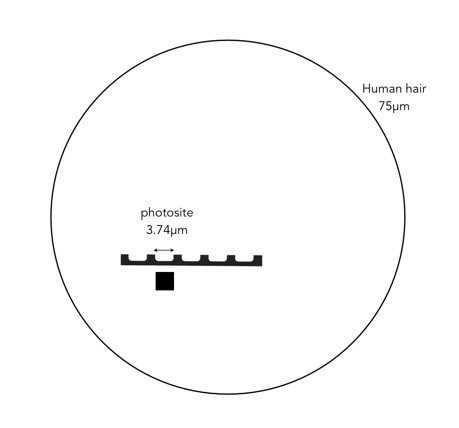
The size of a photosite, is often termed pixel pitch, and is measured in micrometres (or in old terms microns). A micrometre, represented by the symbol µm, is a unit of measure equivalent to one millionth of a metre. It is equivalent to 0.001mm. To put this into context, the nominal diameter of a human hair is 75µm. The area of a photosite is represented by µm². For example, the Olympus E-M5(II) has a pitch of 3.74µm, or 0.00374mm, which is 20 times smaller than a human hair.

comparison of human hair and photosite
Comparison the size of a photosite with a human hair

In order to increase the number of photosites a sensor has, their size has to decrease. Consider an example using a Micro-Four-Thirds (MFT) sensor. An Olympus OM-D E-M5 Mark II fits 16.1 million photosites onto the sensor, whereas an Olympus OM-D E-M1 Mark II fits 20.4 million. This means the pixels on the E-M1(II) will be smaller. This works out to a pixel area of roughly 13.99 µm² versus 11.02µm². This may seem trivial, but even a small difference in size may impact how a photosite functions.

The Bayer filter

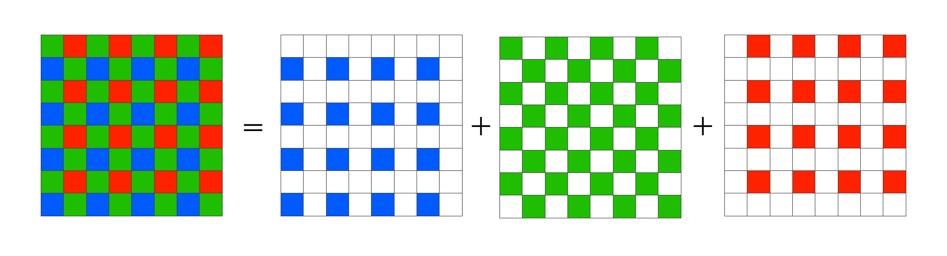
Without the colour filters in a camera sensor, the images acquired would be monochromatic. The most common colour filter used by many camera is the Bayer filter array. The pattern was introduced by Bryce Bayer of Eastman Kodak Company in a 1975 patent (No.3,971,065). The raw output of the Bayer array is called a Bayer pattern image. The most common arrangement of colour filters in Bayer uses a mosaic of the RGBG quartet, where every 2×2 pixel square is composed of a Red and Green pixel on the top row, and a Green and Blue pixel on the bottom row. This means that not every pixel is sampled as Red-Green-Blue, but rather one colour for each photosite. The image below shows how the Bayer mosaic is decomposed.

bayer-array
Decomposing the Bayer colour filter.

But why are there more green filters? This is largely because human vision is more sensitive to colour green, so the ratio is 50% green, 25% red and 25% blue. So in a sensor with 4000×6000 pixels, 12,000 would be green, and red and blur would have 6,000 each. The green channels are used to gather luminance information. The Red and Blue channels each have half the sampling resolution of the luminance detail captured by the green channel. However human vision is much more sensitive to luminance resolution than it is to colour information so this is usually not an issue. An example of what a “raw” Bayer pattern image would look like is shown below.

bayer-testout
Actual image (left) versus raw Bayer pattern image (right)

So how do we get pixels that are full RGB? To obtain a full-color image, a demosaicing algorithm has to be applied to interpolate a set of red, green, and blue values for each pixel. These algorithms make use of the surrounding pixels of the corresponding colors to estimate the values for a particular pixel. The simplest form of algorithm averages the surrounding pixels to derive the missing data. The exact algorithm used depends on the camera manufacturer.

Of course Bayer is not the only filter pattern. Fuji created its own version, the X-Trans colour filter array which uses a larger 6×6 pattern of red, green, and blue.

How do camera sensors work?

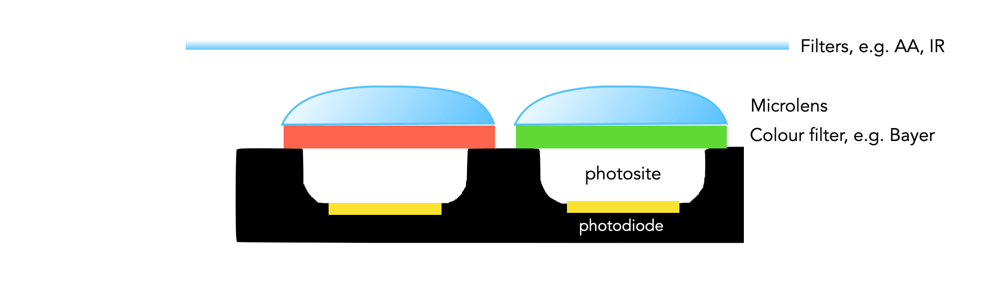
So we have described photosites, but how does a camera sensor actually work? What sort of magic happens inside a digital camera? When the shutter button is pressed, and the sensor exposed to light, the light passes through the lens, and then through a series of filters, a microlens array, and a colour filter, before being deposited in the photosite. A photodiode then converts the light into an electrical signal produced into a quantifiable digital value.

Cross-section of a sensor.

The uppermost layer of a sensor typically contains certain filters. One of these is the infrared (IR) filter. Light contains both ultraviolet and infrared parts, and most sensors are very sensitive to infrared radiation. Hence the IR filter is used to eliminate the IR radiation. Other filters include anti-aliasing (AA) filters which blur the lines between repeating patterns in order to avoid wavy lines (moiré).

Next come the microlenses. One would assume that photosites are butted up against one another, but in reality that’s not the case. Camera sensors have a “microlens” above each photosite to concentrate the amount of light gathered.

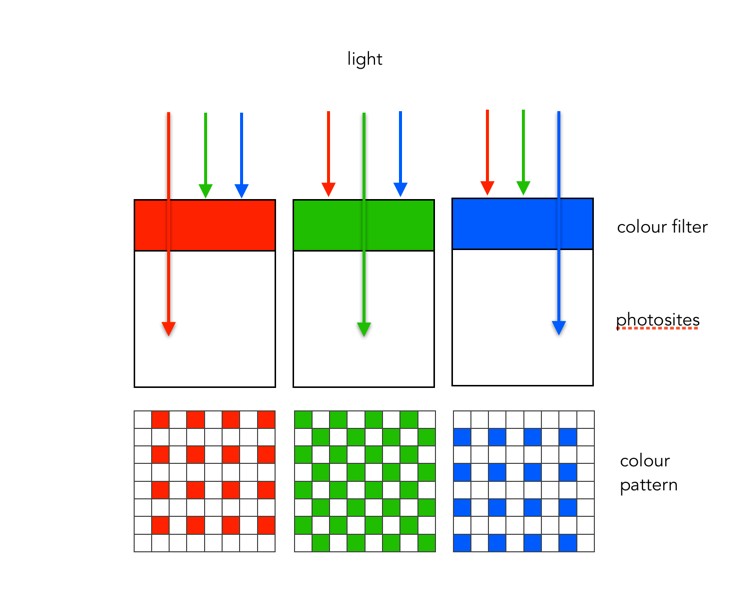
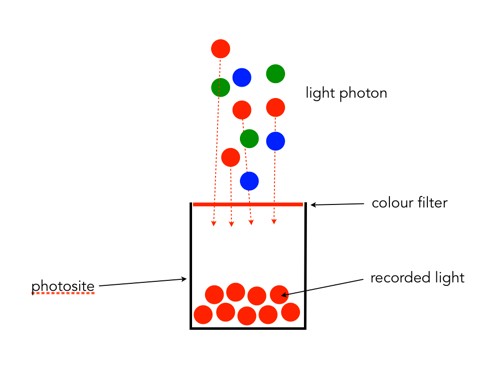
Photosites by themselves have a problem distinguishing colour.  To capture colour, a filter has to be placed over each photosite, to capture only specific colours. A red filter allows only red light to enter the photosite, a green filter only green, and a blue filter only blue. Therefore, each photosite contributes information about one of the three colours that, together, comprise the complete colour system of a photograph (RGB).

sensor-colour1
Filtering light using colour filters, in this case showing a Bayer filter.

The most common type of colour filter array is called a Bayer filter. The array in a Bayer filter consists of a repetitive pattern of 2×2 squares comprised of a red, blue, and two green filters. The Bayer filter has more green than red or blue because human vision is more sensitive to green light.

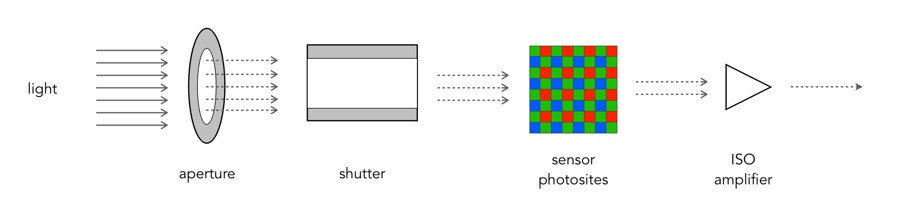
A basic diagram of the overall process looks something like this:

Light photons enter the aperture, and a portion are allowed through the shutter. The camera sensor (photosites) then absorbs the light photons producing an electrical signal which may be amplified by the ISO amplifier before it is turned into the pixels of a digital image.

Why camera sensors don’t have pixels

The sensor in a digital camera is equivalent to a frame of film. They both capture light and use it to generate a picture, it is just the medium which changes: film uses light sensitive particles, digital uses light sensitive diodes. These specks of light work together to form a cohesive continuous tone picture when viewed from a distance. 

One of the most confusing things about digital cameras is the concept of pixels. They are confusing because some people think they are a quantifiable entity. But here’s the thing, they aren’t. Typically a pixel, short for picture element, is a physical point in an image. It is the smallest single component of an image, and is square in shape – but it is just a unit of information, without a specific quantity, i.e. a pixel isn’t 1mm2. The interpreted size of a pixel depends largely on the device it is viewed on. The terms PPI (pixels per inch) and DPI (dots per inch) were introduced to relate the theoretical concept of a pixel to real-world resolution. PPI describes how many pixels there are in an image per inch of distance. DPI is used in printing, and varies from device to device because multiple dots are sometimes needed to create a single pixel. 

But sensors don’t really have “pixels”. They have an array of cavities, better known as “photosites”, which are photo detectors that represent the pixels. When the shutter opens, each photosite collects light photons and stores them as electrical signals. When the exposure ends, the camera then assesses the signals and quantifies them as digital values, i.e. the things we call pixels. We tend to use the term pixel interchangeably with photosite in relation to the sensor because it has a direct association with the pixels in the image the camera creates. However a photosite is physical entity on the sensor surface, whereas pixels are abstract concepts. On a sensor, the term “pixel area” is used to describe the size of the space occupied by each photosite on the sensor. For example, a Fuji X-H1 has a pixel area of 15.05 µm² (micrometres²), which is *really* tiny.

A basic photosite

NB: Sometimes you may see photosites called “sensor elements”, or sensels.