One characteristic of digital cameras which is more often than not ignored in reviews is their usability. Now usability in this context looks at how easy it is to use a camera. There are two levels of usability in a digital-camera. The first has to do with the usability of the software, i.e. generally how easy is it to navigate through the menu, and find things. The second has to do with physically operating the camera, e.g. how the camera is held, how the physical controls are laid out, etc. In the age of film cameras, the layout of buttons and levers was pretty much consistent for most cameras, often constrained by the physical mechanisms inside the camera. When film cameras started to gain more electronics, usability started to become more of an issue.
The simplest compact 35mm film cameras were exactly that – simple. As a good example, consider the AGFA Optima 335. It was aesthetically beautiful, and had a minimal number of controls. Using it involved (i) loading the film; (ii) setting the film speed (both done once for each roll); (iii) setting the distance; (vi) pointing the camera at the scene; and (v) pushing the shutter release. Obviously it was an automatic exposure camera, but everything was in the right place.
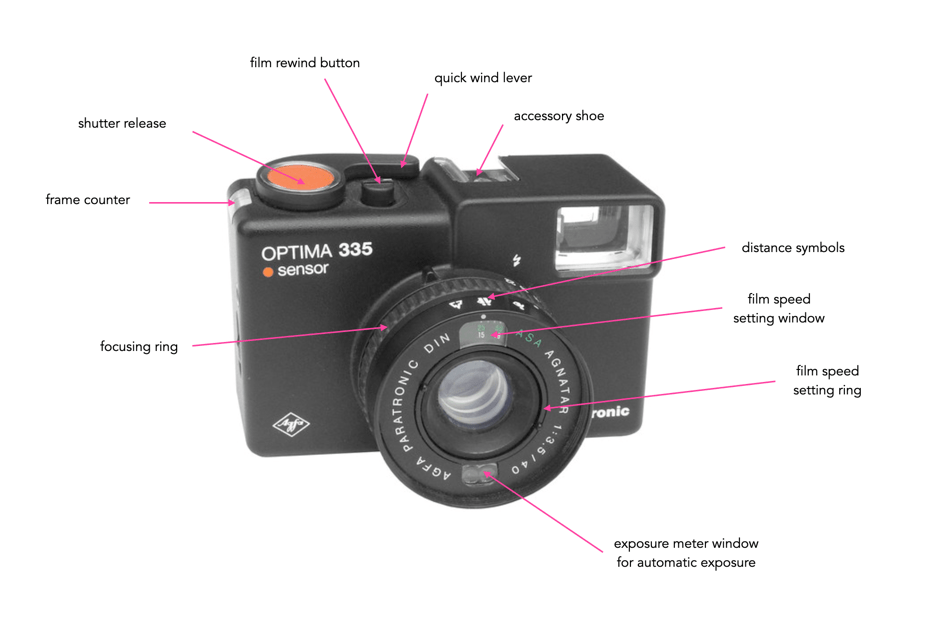
When things started to move away from manual controls, which let’s face it were basically (i) film speed, (ii) shutter speed, (iii) lens aperture, and (iv) lens focusing, things started to gets more challenging from a usability perspective. The more features added, the more physical controls, or electronic menus a camera needed. It’s the reason people tend to like vintage film cameras like the Pentax Spotmatic. There is just so little involved in taking a picture.

Digital cameras may be the worst from a usability perspective. Usability is sometimes ignored because “generic” reviews tend to concentrate on the “fancy” features of a camera, and neglect usability. You need to go to blog-based reviews by photographers who have actually used cameras in real-world settings to get a real idea about a camera’s usability. Note that if you are unsure about a camera, it is really important to go to a store and actually handle it, to get a real feel as to whether or not it is comfortable and intuitive to use. Sometimes it is the little things that make a camera not feel quite right. The awkwardness of a particular button, the ease of deleting an image, signage too small to read, or an annoying viewfinder.
The first issue to consider is physical “usability”, or comfort – basically how the camera “feels” in your hands. Does it require two hands to hold, or is one fine? Is there enough room on the camera to actually grip it? Is the camera the right size from the perspective of your hands? Some people have large sized hands, and find it uncomfortable to hold a small camera with manipulate small controls. Conversely, people with small hands might find it wearisome holding up a heavy full-frame camera with a heavy lens. Is the camera body a “block” or does it have a grip? Grips make it much easier to grasp a camera, particularly a larger one. Some camera manufacturers provide camera grips as accessories, or perhaps there is one made by a third-party if it is a popular camera. Like gloves, one size does not fit all.
Usability also has to do with size, and weight and that’s where sensor size plays a role. Full-frame cameras are the largest of the regular format cameras (i.e. smaller than medium format), and together with their lenses are generally heavy and large. Compact cameras are small and light. Depending on its use, the size and weight of a camera can play a large role in how useable it is. For example travelling with a full-frame camera and all its lens accoutrements by air, and on public transport can be back-breaking, yet travelling with it in a car and using a tripod, maybe not so much. A compact camera can easily be slipped into a pocket and weigh next to nothing. Size and weight issues also translate to lenses. Large full-frame lenses can be heavy, because they require more glass. Although most camera manufacturers provide various choices when it comes to lens sizes, with appropriate tradeoffs in image quality.
Next there are those characteristics of a camera related to its use. Is there a viewfinder, and is it comfortable to press your eye up against? Is the shutter-release button comfortable to use? What is the screen like – does it pivot and tilt? Is the image crisp? Does it provide a reasonably good rendition of the colours in the image? What about the physical controls? Is it easy to delete an image? Is there a macro function with easy accessibility? Are the controls accessible, even when taking a picture?
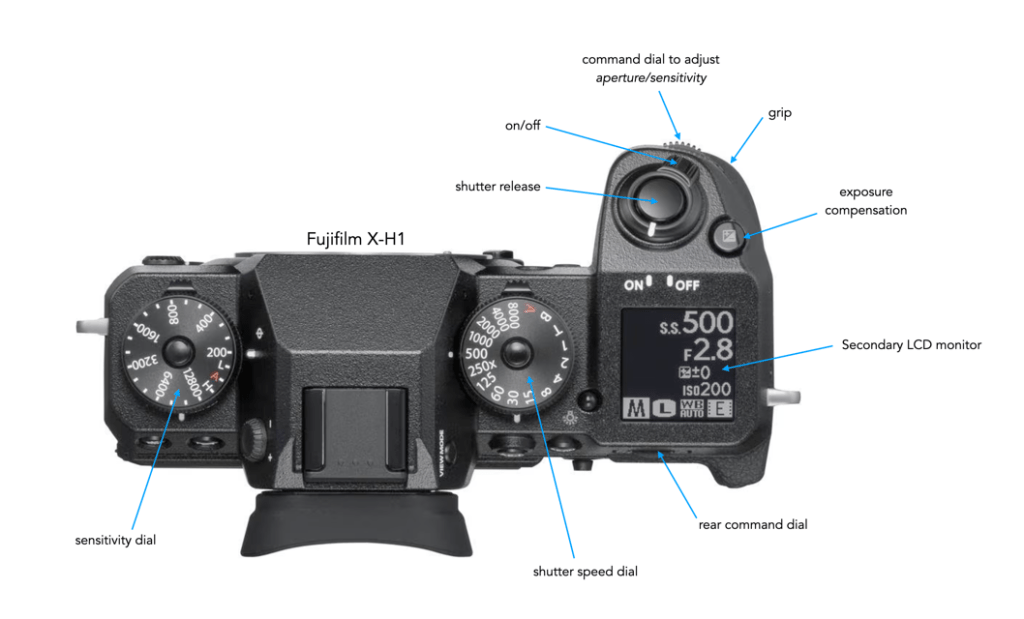
Consider the layout of the top of a Fujifilm X-H1 shown in Figure 3. The camera body is large, and hence a grip is provided on the right-hand side. The shutter release button is located in an optimal position, surrounding by readily accessible controls, i.e. shutter speed control, etc. The secondary LCD monitor also provides a good summary of current setting on the top of the camera, in addition to the rear screen. The fact that there are physical controls for sensitivity (aka ISO, but a better term because it’s not really the same as film ISO), and shutter speed makes it much easier to adjust them, as opposed to a button, and having to rely on watching a screen.
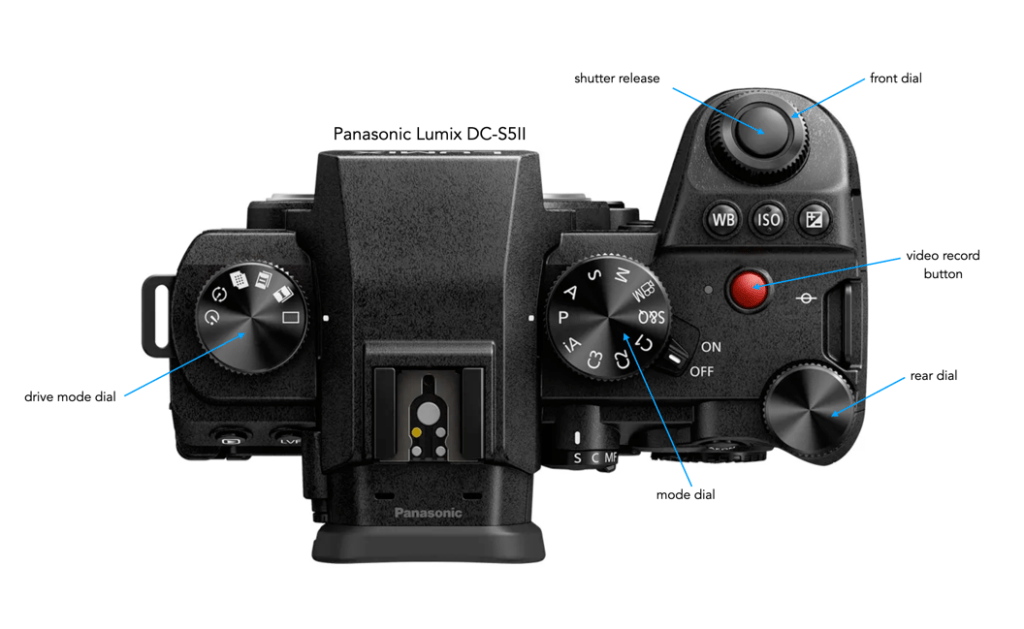
Cameras from other manufacturers often may lack these basic controls, opting instead for a more customizable top configuration, as shown for the Panasonic Lumix DC-S5II in Figure 4. In place of the shutter speed dial, there is mode dial, and a drive mode dial in place of the sensitivity dial. The Fuji requires WB (white balance) to be modified in-menu, whereas the Panasonic provides a dedicated button. The shutter speed and aperture can be modified on the Panasonic based on mode setting, using the front and rear dials. So two different approaches to functional usability – some people may prefer one over the other. From my own perspective, I prefer to have shutter speed and sensitivity readily accessible as marked controls. Changing camera mode or even drive mode is something I don’t do that often (I won’t get into the nitty gritty of specific camera usability).
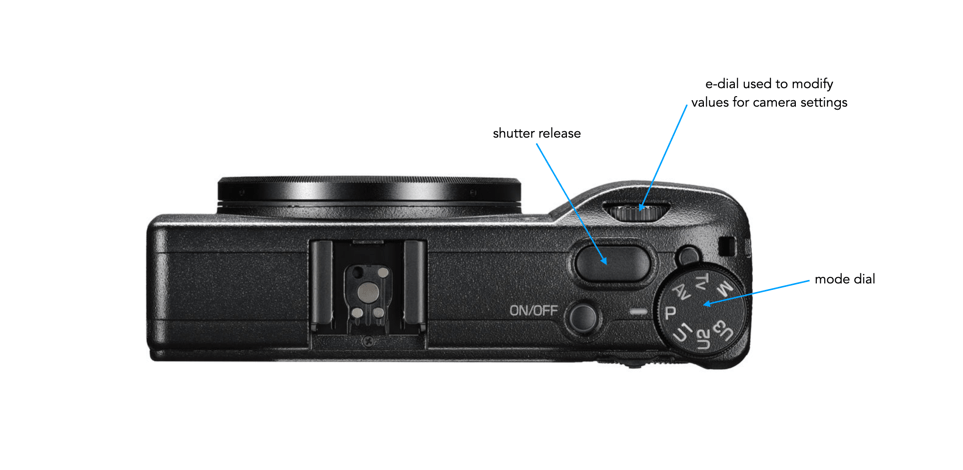
In comparison, a more compact camera, like the Ricoh GR III will have little in the way of external controls on the top, with most changes actuated via the menu or back-buttons (e.g. Macro, WB). These types of cameras are commonly used for street photography where setting may not change that often. It is much more of a minimalist approach to usability.
Usability also extends to the lens. Does the lens have a physical means of switching to manual mode? Is the focusing mechanism smooth (in manual mode). Is it easy to attach filters? How heavy is the lens? Will it be comfortable to lug the lens around all day? Then there is also the camera mount. You may want to attach vintage lenses which have different mounts, and hence need a converter. Is there a converter from camera-X to lens-Y? What about the tripod mount? Is it in the centre of the camera or bias to one side? Then there is maybe the biggest elephant in the room – battery life? Usability of a camera plummets if one battery charge only takes 200 photos. This means you will need to carry more batteries, which means more weight. Is the charger small and easy to pack anywhere?
Last but not least there is the software usability side of things. This really is a category unto itself. Menu screens are usually very small, and can be quite cluttered, even if some care has been taken in designing the actual menu. By what means does one interacts with the screen, i.e. button or touch. What does the screen show, and what does it let you manipulate. Is is customizable? Does changing a simple thing require you to delve into the menu system? Do you need to carry the manual just to access the maze of menus to change something?
There are many different facets to usability, and choosing a digital camera based on its usability characteristics is often ignored with users opting instead for the more “tangible” features of a digital camera, i.e. megapixels, lens selection, brand, cost etc. And while the interaction with a camera is a very individual experience, not every camera will offer a perfect usability experience for every person.
 Crafting Pixels