I have always had Macs of one form or another. All have the ubiquitous Retina display. In earlier Macs, you could easily change the resolution to whatever was required, but the Retina displays are somewhat bewildering when it comes to their resolution. A 13.3″ display has a resolution of 2560×1600 pixels at 227ppi, but it isn’t actually possible to obtain that sort of resolution using the system control on the Mac, i.e. there is no 1:1 correspondence between image pixel and screen pixel. The best they can do is “Scaled” resolution which provides one of four options:
- 1024 × 640 = ×2.5
- 1280 × 800 = ×2
- 1440 × 900 (default) ×1.77
- 1680 × 1050 = ×1.52
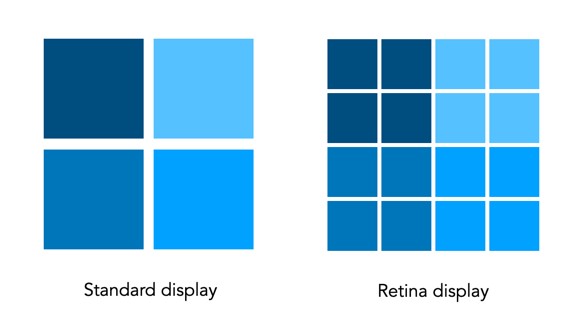
Why? Because the Retina display uses pixel-scaling, so the display at the setting of 1280 × 800 is scaled at 2 times the actual resolution, giving a “high-resolution” of 2560 × 1600 pixels. So every pixel is doubled to four times the detail. So a 280 × 280 pixel image displayed using the default setting is scaled 1.77 times, which means it displays as 496 pixels, which at 227ppi, means it is 2.1875 odd inches on the screen.
How to fix it? Use one of the 3rd party utilities like EasyRes. It installs in the top menu, and you can easily convert between screen settings… although the negative is that at 2560×1600 pixels, things other than images appear *very* small.
 Crafting Pixels